We understand your school’s workflow and demonstrate the JEdu modules relevant to your office, teachers, students, and parents.

Loading JEdu...
One Platform. Every School. Every Solution.
Loading JEdu...
One Platform. Every School. Every Solution.
JEdu gives your school its own dedicated School ERP — hosted and managed exclusively for you. Your school gets an individual cloud panel and dedicated database, completely isolated from other schools. Manage students, fees, attendance, admissions, payroll, and parent communication from one secure platform. Go live in as little as 6 hours, with 24/7 support and complete staff training included.
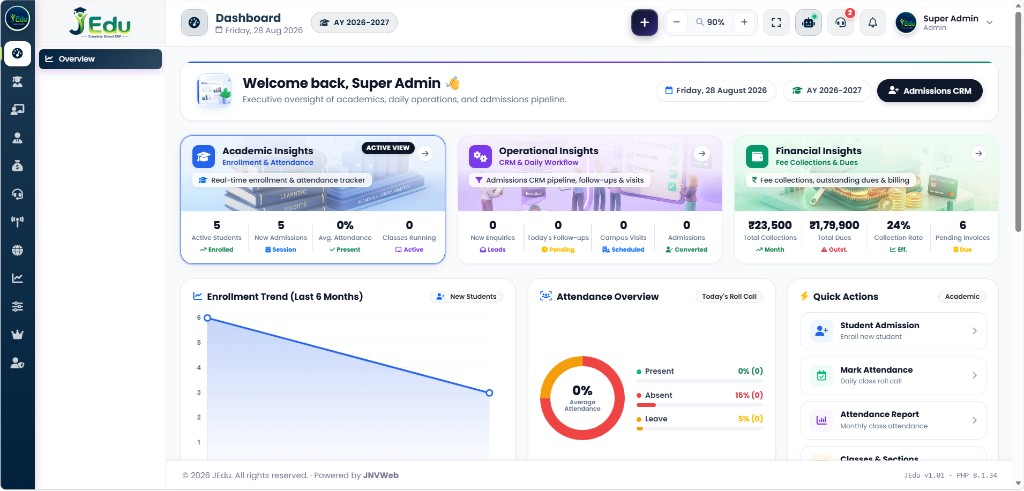
Students, fees, attendance, admissions, academics, payroll, WhatsApp, and parent communication — all connected in one complete school ERP.
Student profiles, class management, documents & certificates.
Fee structures, invoices, collections, receipts, dues & reports.
Class attendance, biometric import, leave management & reports.
Enquiries, follow-ups, applications, admission pipeline & reports.
Classes, subjects, timetable, homework, exams, grades and report cards.
Staff management, attendance, leave, payroll, salary slips & reports.
Receipts, alerts, reminders, campaigns & parent communication.
Fees, attendance, homework, results, notices, messages & documents.
These modules are in the product today — not a brochure list. Pick a tab, then open the same area in the live demo.
Manage complete student records from admission to graduation — including classes, parents, documents, attendance, health, certificates, academic history, and more.
From admission to academic rollover, JEdu keeps every student’s information connected.
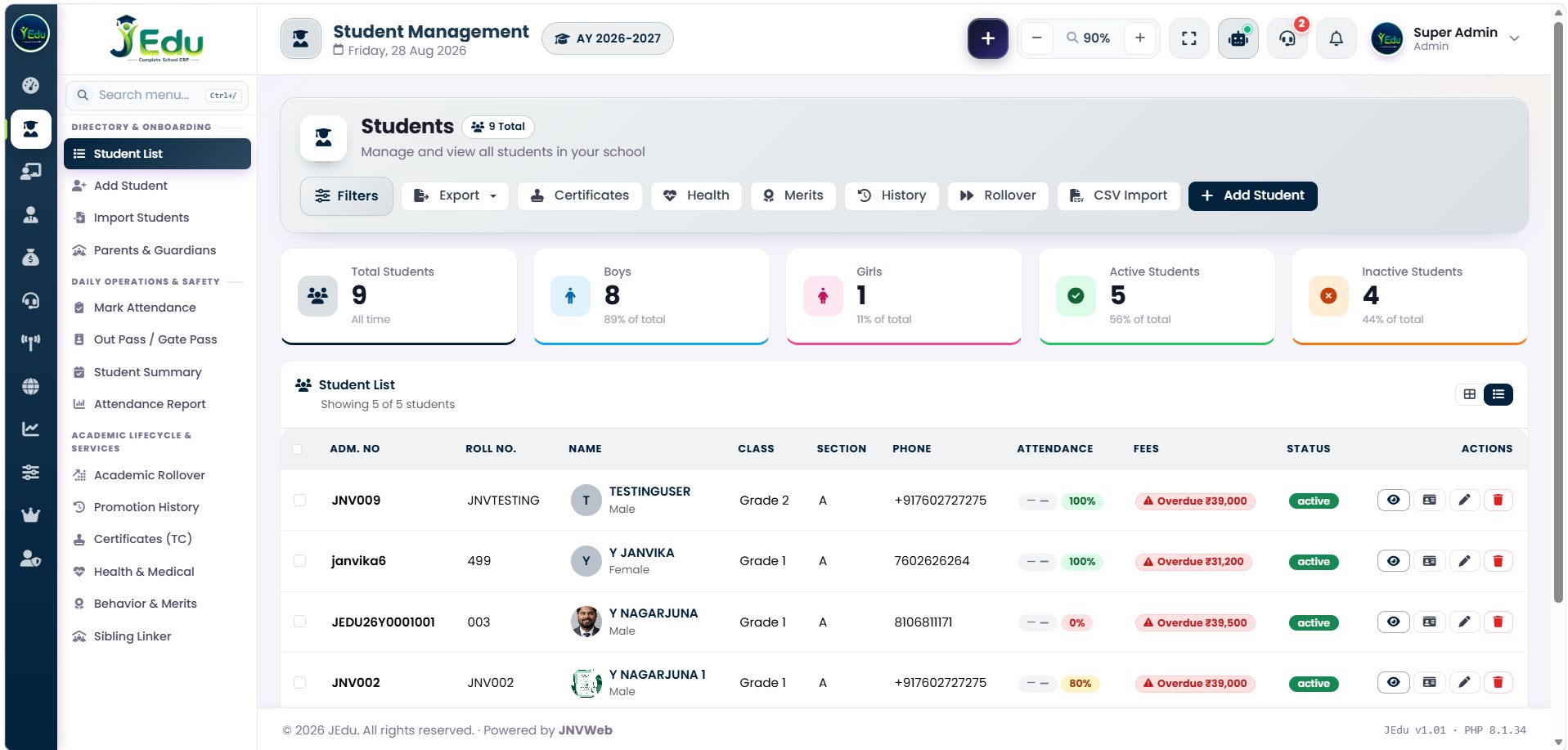
Set fee heads and structures, generate invoices and instalments, take cash/UPI/online payments, print receipts, close the day, track cheques and refunds, and send defaulter reminders. Parents can submit payment proofs from their portal.
Connect your school’s WhatsApp Cloud number. Send fee receipts, absence alerts, homework reminders, and approved template campaigns. Use the inbox for two-way chat inside the 24-hour window. Parents do not need to install a school app.
Capture enquiries, schedule campus visits, run follow-ups, and convert a lead into a student in one click. Photograph a paper admission form — the AI scanner extracts details for staff to verify before admit.
Teachers mark period or daily attendance in the ERP. Staff punches can be imported from biometric / RFID logs. Parents can see their child’s calendar in the portal, and absence alerts can go out on WhatsApp.
Set up classes and subjects, build the timetable, assign teachers, publish homework, enter exam marks, and print report cards. Day-to-day academics stay in the same school login as fees and attendance.
Maintain teaching and non-teaching staff: departments, designations, documents, ID cards, attendance, leave policies and approvals, salary structures, payroll batches, and salary slips — including WhatsApp delivery to teachers.
Each parent gets a mobile-friendly portal: child’s homework, timetable, published results, attendance, fee invoices and payment proof, documents, and notices. Daily alerts can still arrive on WhatsApp so nobody is forced to install an extra app.
Bundled with the ERP — open the live sample in the section below.
Print student and staff ID cards, TCs, and HR certificates from the same records.
Issue and print student out-pass so the gate and office share one record.
Share classroom camera links with parents from the live-class module.
Separate menus and permissions. Super-admin tools for the platform operator.
Logo, colours, and school name on login, receipts, and the public site.
Fee and attendance reports plus an activity log of who did what in the office.
Scheduled database backups from the control panel — your school’s data, retained on a cycle.
From your first demo to going live, we handle the setup, data, integrations, training, and ongoing support — so your school can start using JEdu without managing servers or software.
Simple steps. Fast start.
We understand your school’s workflow and demonstrate the JEdu modules relevant to your office, teachers, students, and parents.
We collect your school details, classes, sections, fee structure, staff and student information, branding, WhatsApp requirements, biometric setup, and other configuration needs.
We configure your dedicated JEdu cloud panel, school database, school URL, branding, users, permissions, and required modules.
We import your student and staff data, configure WhatsApp, connect biometric data where required, and complete the necessary integrations.
We test the complete setup with your team, make final adjustments, and take your school live. Typical go-live is 24–48 hours after the required data is ready.
Complete staff training and 1 year of support are included at no additional cost, so your team can confidently use JEdu from day one.
Every JEdu school can use the bundled public website — enquiry form, programs, gallery, and WhatsApp — instead of paying a separate web agency on day one. Open the live sample to see the template.
Home · About · Programs · Gallery · Enquiry
Included with JEdu · customisable brandingDashboard, students, fees control, admissions CRM, WhatsApp, users, and school settings in one place.
Fee heads, collections, receipts, day-close, cheques, refunds, defaulters, and reports.
Mark attendance, publish homework, see timetable and allocated classes, apply for leave.
Portal plus WhatsApp: homework, attendance, fees, documents — without a mandatory app store download.
Per school. Each school gets its own JEdu cloud — your students, fees, staff, and WhatsApp number. It is not a public classroom marketplace.
No. They can use the parent web portal and receive receipts and alerts on ordinary WhatsApp. That is the point of the WhatsApp Cloud integration.
JEdu connects to Meta WhatsApp Cloud API. Conversation charges from Meta are billed according to Meta’s rates for your school’s number. We set up the integration; we do not hide that line item.
Staff punches can be imported from standard machine logs (CSV). Classroom student attendance is marked in JEdu. Tell us your device brand on the demo call so we can confirm the import format.
Most schools start in 24–48 hours after student and staff Excel files are ready. WhatsApp template approval with Meta can take extra time — we start the office modules first.
On the cloud hosting we run for your school, with role-based logins and scheduled backups. You decide who in the office is an admin, teacher, or parent.
See the live ERP, or message us on WhatsApp for a walkthrough of fees, attendance, admissions, and parent WhatsApp — set up for your school.